Lifecycles
Everything the platform runs for you is asked for, started, kept up and eventually taken down again. This page is that whole arc in one place: what moves a thing from one state to the next, which of those moves you make and which the platform makes on its own, and—the part worth reading before you need it—how much warning you get before anything stops.
Three things have a life of their own here, and they're worth keeping apart because they're on different clocks:
| A revision | One version of your application: the compose file you uploaded, the images built from it, and the record of what happened to them. Immutable—every sc deploy makes a new one |
| A running stack | The containers a revision actually put on a swarm. This is the thing that costs money, and the thing a teardown takes away |
| A managed database or bucket | Owned by the organization rather than by an application, so it outlives any single deploy. See Managed databases |
A revision can exist for months without ever having run; a stack can come down without its revision going anywhere. Most of the confusion about "what happened to my app" comes from reading one of those as the other.
A revision, from sc deploy to running
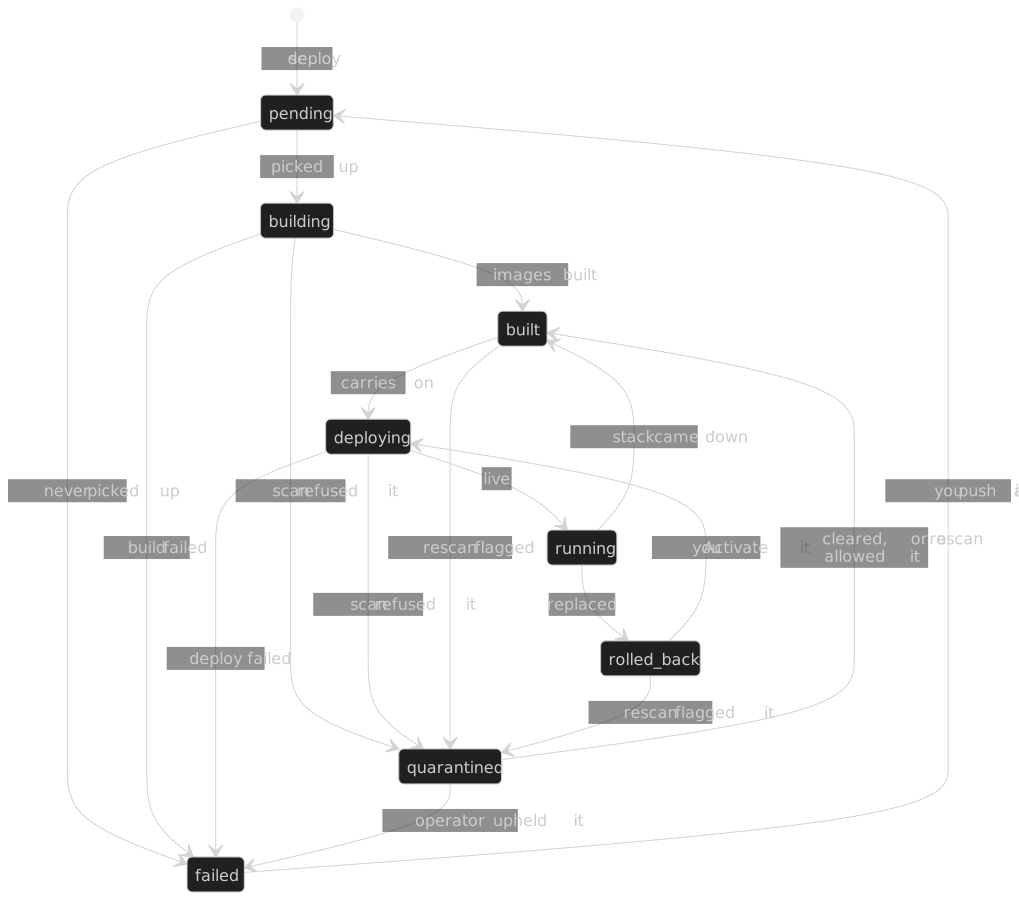
The spine down the middle is the ordinary case, and it's the only part most
deploys ever touch: pending → building → built → deploying →
running. Everything else on the diagram is either a way out of that spine or
a way back into it.
Two states on it are worth understanding well, because they're the ones that surprise people.
built is a resting state, not a stage. It means the images exist and
nothing is running them. A revision can sit there indefinitely without anything
being wrong—nobody has asked for it to go live. An sc deploy asked for a
deploy rather than a build, so it passes straight through built on its way to
deploying. A revision that reaches built any other way stays there until you
press Activate.
quarantined isn't a build failure and redeploying won't clear it. An
image scan refused something, so the revision is held rather than run. For a
build or a pull, nothing already running changes—but a scan can also flag
a digest that's already live, in which case that stack stops too (see
What takes a running application down
below). Only an operator can clear it or uphold it—see
Applications, which lists every state with
what it means for that revision.
Getting back to running
Two states are deployable, and for the same reason: the images exist and nothing is running them.
| From | How you get back to running |
|---|---|
built |
Activate it from the deployment history |
rolled_back |
The same—rolling forward to an older revision is an ordinary deploy, not a special gesture |
failed |
You don't. Push a new revision. The same tree would fail the same way |
quarantined |
Not yours to clear. Ask support if you think the scan was wrong |
What any of this costs
Only running containers are charged for. A revision sitting at built,
failed, rolled_back or quarantined has nothing running and costs nothing
to keep—there is no storage charge on an idle revision, and pricing folds image
builds into the total rather than billing them on their own (Pricing). Keeping old
revisions around so you can roll back to them is free.
What takes a running application down
Nothing stops an application without a reason. The diagram below covers the three billing-related and access-related ones—two give you a grace period first, one is you—and the table underneath adds a fourth that isn't like the other three: a security stop, immediate and without warning, because the thing it's reacting to is a live risk rather than an account state.
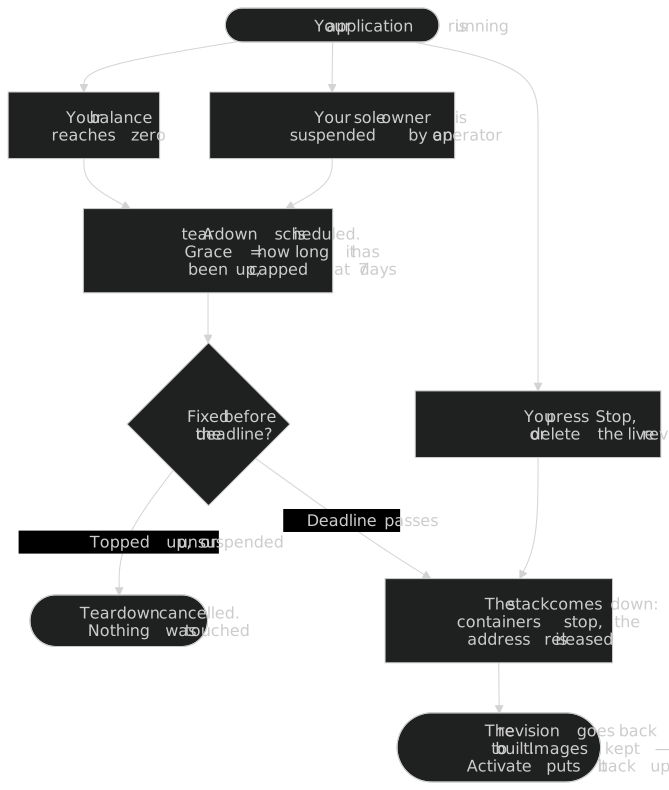
| What happened | Warning you get | How to stop it |
|---|---|---|
| You pressed Stop, or deleted the live revision | None—it's immediate, because you asked | Activate the revision again |
| The balance reached zero | A notification and an email to the owner when the projected runway drops under 7 days, then a scheduled teardown you can see coming | Top up; the teardown is cancelled on the next check |
| A platform operator suspended the organization's sole owner | The scheduled teardown | Ask support—only an operator can lift a suspension |
| A scheduled image rescan flagged the running digest as malicious or worse than your tier tolerates | None—it stops in the same pass that flags it | Not yours to clear—the revision sits at quarantined until an operator clears or upholds it. See Scan quarantine |
The grace period is however long it has been up
A teardown isn't immediate. The grace period is the application's own uptime, capped at seven days—so what you get is proportional to what you would lose. The platform measures it once, at the moment it arms the teardown, and the deadline it gives you doesn't move afterwards.
| Up for | Grace period |
|---|---|
| An hour | An hour |
| Three days | Three days |
| Two months | Seven days—the cap |
The reasoning is that a revision an hour old has an hour's worth of value in it and its owner is probably still at the keyboard, while something that has been up for months shouldn't have its rescue turned into a race. Fixing the underlying cause—topping up, or getting the suspension lifted—cancels the teardown outright. Nothing is torn down early, and nothing is torn down without the clock having run.
The platform tells you when the clock starts, when it's called off, and if it
runs out. Arming a teardown raises a Teardown scheduled notification to
everyone in the organization, naming the application, and the deadline. Clearing
the underlying cause raises Teardown cancelled, one per application it
saved, so every deadline it gave you gets an answer that names the same
application. The teardown itself raises Application torn down. All three
land in Notifications. You don't have to run a deploy to
discover any of them. The refusal on sc deploy says the first, but it only
reaches whoever happens to deploy next, and it says nothing at all once it
stops appearing.
A teardown isn't a deletion
When a stack does come down, the containers stop and the published address is
released—but the revision goes back to built and keeps its images. It's
immediately redeployable: press Activate and it goes back up. Your compose
file, your build, your variables and your deployment history are all still
there.
What you lose is anything that was only inside a container. Data written to a container's own filesystem doesn't survive it stopping, which is the argument for a managed database rather than a database running as one of your own compose services.
Managed databases keep their own time
A database doesn't follow any of this. It belongs to the organization rather than to an application, so deploys, rollbacks and teardowns leave it alone entirely. Where an application gets days of grace, a database gets suspended the moment the balance crosses zero, because a suspension is reversible and a teardown isn't.
That has its own page: Managed databases.