Managed databases
A managed database is one the platform runs, backs and bills for you, instead of one you declare as a service in your own compose file. It belongs to the organization rather than to an application, so the same database can back a web app and its worker, and it survives every deploy, rollback and teardown those applications go through.
Find them under an organization → Managed services. Buckets live on the same page and follow the same lifecycle; everything below applies to both, except where it talks about roles and SQL.
Why it's not just a container you run yourself
You can put Postgres in your own compose file, and nothing stops you. The difference is what happens when the container stops.
| Your own compose service | A managed database | |
|---|---|---|
| Where the data lives | Inside the container's filesystem | On the platform's engine, outside anything your deploy replaces |
| Surviving a redeploy | A rolling update replaces the container | Untouched—it's not part of your stack |
| Surviving a teardown | Gone with the stack (Lifecycles) | Untouched, and still there when you deploy again |
| Running out of credit | Torn down with everything else, after a grace period | Suspended—logins refused, data kept |
| What you are billed | Container-seconds, like any other service | Storage by the GiB-month, plus what your queries make the engine do |
Creating one
On the organization's Managed services page, pick an engine, give it a name and press Create. The name is yours and only has to be unique within the organization—lowercase letters, digits and hyphens, up to 63 characters.
From the CLI, the same thing:
sc service create postgres:17 hearth
The first database on a given engine version waits; every one after it does not. An engine nobody has used yet is a catalogue entry rather than a running thing, so the first request stands one up—a container image to pull and a database server to start, which is a minute or two. The page tells you when this is what you are waiting for. Every subsequent database on that same engine is a handful of statements and lands in seconds.
Once it's Available the page shows you the connection details.
The states it moves through
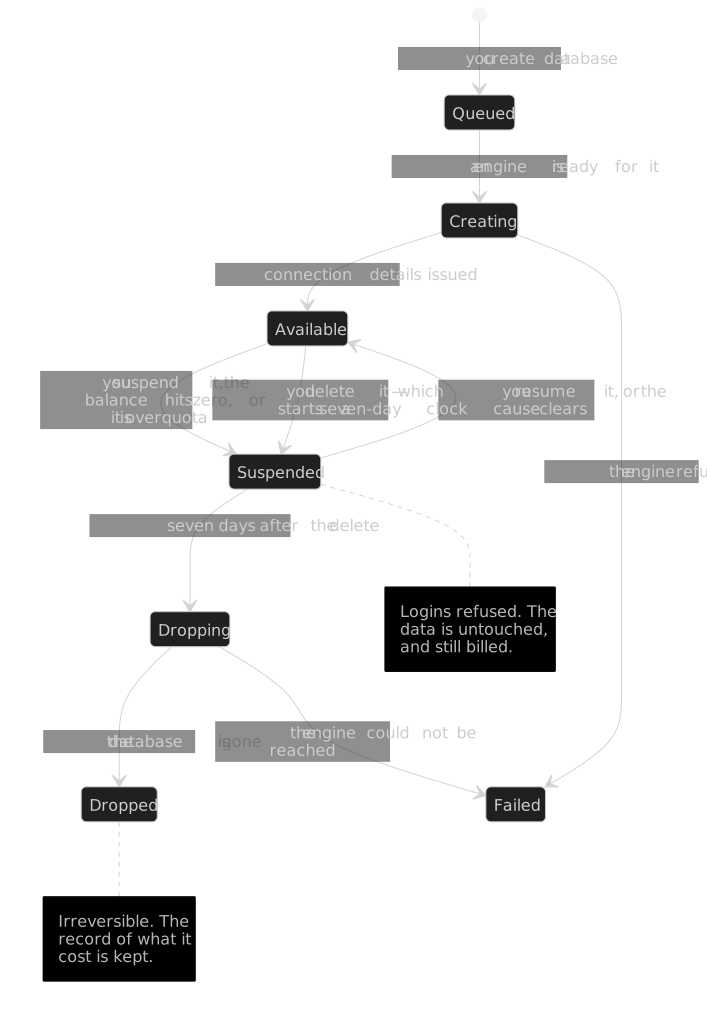
The state is the chip beside the name, on both the list and the detail page.
| State | What it means |
|---|---|
| Queued | Accepted, waiting for an engine to be ready for it |
| Creating | The role and the database are being made |
| Available | Working. The only state that accepts logins |
| Suspended | Off, but kept. Logins are refused; the data is untouched, and still billed for its storage |
| Dropping | The irreversible delete is running |
| Dropped | Gone. The row stays so the record of what it cost survives |
| Failed | The engine refused something. The reason is on the detail page |
Suspension: off, but not gone
Suspending is the platform's word for "off," and it's not deletion, by design. Logins stop. Every byte stays exactly where it was, and the platform keeps billing it at the storage rate. It's one reversible statement at the engine, not anything getting destroyed. That's why it's what a zero balance does, instead of the grace-period teardown an application gets.
Three things suspend a database, and the chip tells you which—because the thing you have to do about it differs:
| Chip | Why | What clears it |
|---|---|---|
| Suspended | You or an operator asked for it | Resume it. Nothing clears this on its own |
| Suspended · Credit exhausted | The organization's balance reached zero | Top up. It resumes on its own |
| Suspended · Over quota | It's past its storage quota | Delete data, or ask for help to raise the quota. A top-up won't resume it |
Two rules about coming back that are worth knowing before you need them:
- A top-up only resumes what the platform suspended. If you or an operator switched a database off on purpose, the ledger moving doesn't switch it back on—reversing somebody's decision because a payment landed would be the wrong behaviour.
- Credit and quota are independent, and both have to clear. A database that is out of credit and over quota stays suspended after a top-up, because the second reason is still true.
Deleting one, and the seven days after
Deleting closes the door and starts a clock. It doesn't destroy anything yet. The role is locked so nothing can keep writing to a database its owner believes is gone, the entry disappears from your listings, and the data itself survives for seven days before the irreversible half runs and the state becomes Dropped.
Select Retire on the row in Managed services, or use the command line:
sc service destroy hearth
A database an application is still bound to is refused. Unbinding has a
visible consequence—the application loses its connection details on its next
deploy—and doing it, without warning, as a side effect of a delete is how a
production database gets destroyed by someone tidying up. --force is the way through, so
the destructive path exists but has to be asked for.
Restore it inside the seven days
The Retired list under your services shows each retired service and the days it has left. An owner or an admin can select Restore on the row, or use the command line:
sc service list --retired
sc service restore hearth
A restore gives the service back the state it had before you retired it. A service that was available is available again. A service that was out of credit, or over its quota, comes back suspended, and the usual fix applies: top up, or free some space. The bindings stay through the retirement. So a bound application gets the service back at once, or on its next deploy if it deployed during the retirement.
Once the seven days end and the state reads Dropped, the platform has deleted the data, and nobody can restore it.
Binding it to an application
A database is no use to an application that can't reach it. Binding is what connects the two, and it's per-application:
sc service bind hearth --app web
sc service unbind hearth --app web
The application's own page lists what it's bound to, and the database's detail page has a Bound to section listing it from the other side. On the next deploy the application picks up its connection details as environment variables, and the platform puts a small connection proxy alongside your services so your application talks to something on its own network rather than reaching across the platform's.
Unbinding takes effect on the next deploy, not immediately—a running container keeps the environment it started with.
Adopting a database your compose file already runs
You may already run a database as one of your own compose services. Adoption swaps it for a managed one, and you decide each swap. It's off by default.
On the application's page, the Adoption card has a Turn adoption on button. Only an owner
or admin sees it. With adoption on, the platform reads the current compose file and lists each
service that looks like a database it can replace. An entry says, for example, that db
could become managed postgres.
| Choice | What happens |
|---|---|
| Approve | The platform swaps the service for its managed equivalent on the next deploy. |
| Decline | The service keeps running as your own container. |
You can change a decision later with approve instead or decline instead. Turning adoption on never replaces anything by itself. Turning it off changes nothing that's already adopted. It only stops the platform from detecting new services.
A service the platform sees but can't adopt shows as "not adopted," with the reason. Where a close match exists, the entry names the nearest managed engine on offer.
What it costs
Two meters, both hourly, both on the same ledger as everything else (Billing):
| Meter | Charged on |
|---|---|
| Storage | How much the database is holding, by the GiB-month |
| Engine load | How much work your queries make the shared engine do |
Storage is shown in GiB on the page whatever the number, rather than rounded to whichever unit fits, because GiB-months is what the invoice is in—a 40 MiB database displayed as "40 MiB" would need converting in your head before it could be compared to a bill.
A suspended database still costs storage. That's the trade suspension makes: the platform keeps the data, so keeping it costs you. Delete a database you genuinely don't want any more, rather than leaving it suspended.
Where the states come from
The state on the page is the platform's own record of the database, not a guess from probing it. If one is stuck in Creating, or reads Failed, the detail page carries the reason the engine gave rather than a generic message—that text is the useful thing to quote if you ask for help about it.
For how an application's own containers behave—which is a different lifecycle on a different clock—see Lifecycles.