Billing
Each organization has a shared credit balance, funded by any member via Stripe Checkout (test mode for now—this is a demo integration). Every top-up attempt is recorded as a row in the organization's transaction ledger, whether it succeeds, fails, or is still pending.
Viewing billing
Click the Billing pill on an organization's page to see its balance and transaction history. Any member—owner, admin, or plain member—can view and top up; it isn't restricted to owners/admins the way some other org settings are.
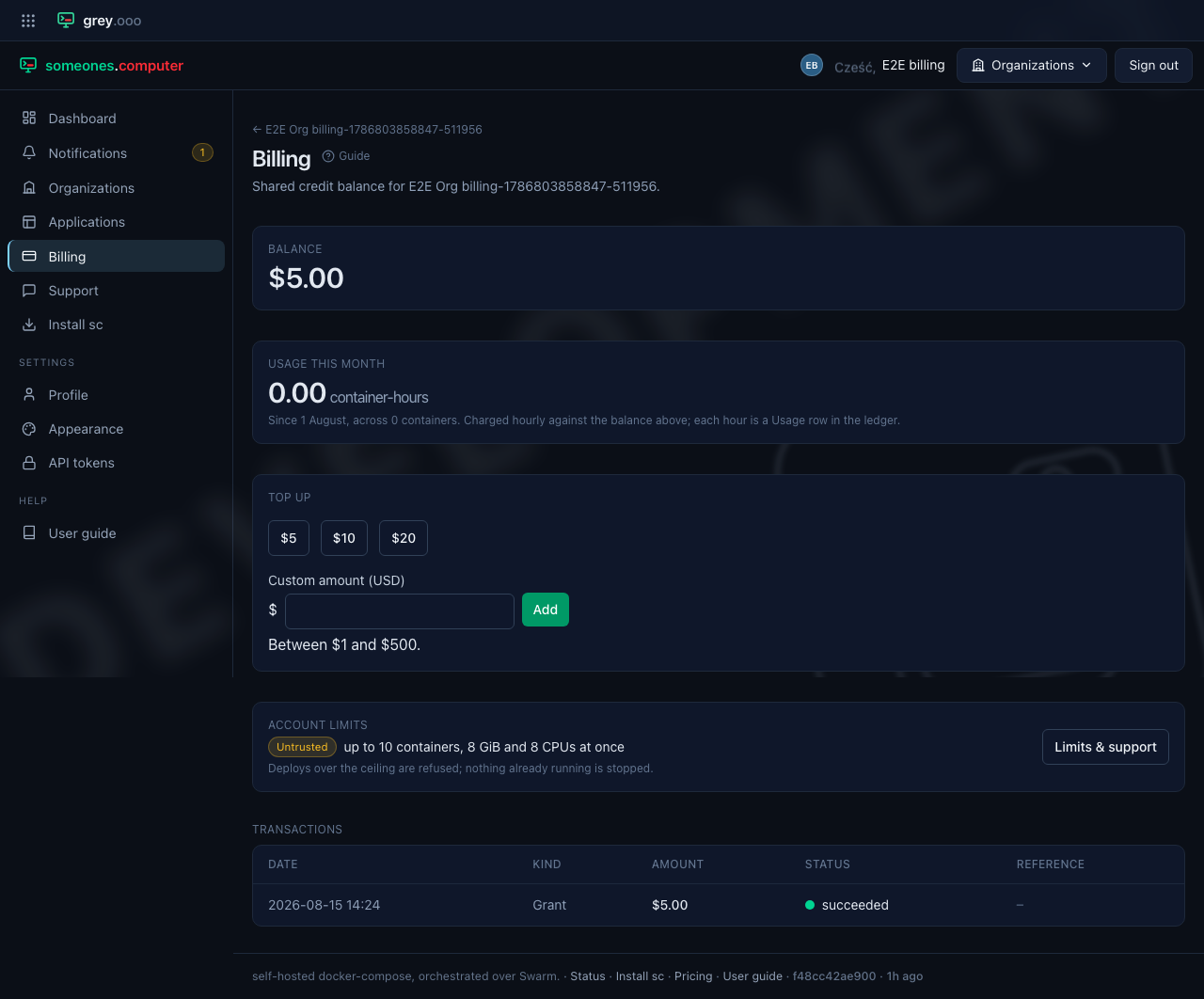
The balance is the sum of everything in the ledger below—money in and money out—and is never a stored figure.

Usage this month
Under the balance is what the organization's applications have actually run this calendar month, in container-hours. It's counted per container, not per service: three replicas running for half an hour each are an hour and a half, not half an hour.
The rates themselves are still placeholders—/pricing says so on the page—but
the meter is real, and the hourly charge below comes from it.

If the platform saw a container start but never saw it stop—and can no longer confirm it's running—it can't count that container, so it doesn't. The card says so in amber and the number is a floor rather than a total.

Containers the platform put in the stack aren't counted either. Binding a managed database makes the deployer write a small proxy alongside the organization's own services. That proxy is how the platform reaches the database rather than something the organization asked for. So it never reaches the meter, and neither does the shared engine behind it. That's deliberate rather than an oversight: billing the proxy would make the same database cost more the more applications bound to it. The engine's cost belongs in the database rate rather than on a compute line. The containers are still shown on the application's own page, because they're running. They just don't appear here.
What spends the balance
Once an hour, the platform charges each organization for what it ran. If it
owns a managed database or bucket, the platform also charges for what that
stored and how much use it saw. These appear as Usage rows in the ledger
below: one for compute, one for a managed service's storage, one for its
engine load, each independent of the others.
Three rules are worth knowing:
| One charge per hour, per meter | An hour is charged exactly once by each meter, however many times the job runs over it. The balance is never more than an hour out of date |
| Unresolved containers aren't charged for | The platform can't measure a container it saw start but never saw stop, so it doesn't bill it. The row records how many there were, next to the hour |
| An hour a meter has nothing to report isn't a row | A zero charge would claim the hour cost nothing, which is a different thing from the platform not having been able to see, or not having sampled anything yet. Nothing to report, nothing to write |
Running out
A zero or negative balance refuses the next deploy immediately, and puts everything already running on a clock. The refusal is instant, and it says both halves—the balance, what's about to happen to what's already running, and a link to this page:
bundle upload failed: Deploying is paused: Acme has a credit balance of $0.00.
Anything already running is now scheduled to be torn down, after a grace period
as long as it has been up and capped at seven days. Top up at
https://someones.computer/organizations/…/billing to call that off and deploy
again.
Nothing is stopped at the moment the balance crosses zero. What happens at that moment is that a teardown is scheduled for each running application, with a grace period of however long that application has been up, capped at seven days. Top up before the deadline and the teardown is cancelled on the next check, with nothing having been touched; leave it, and the stack comes down.
You are told, without having to run a deploy to find out. A Teardown scheduled notification arrives when the clock starts, Teardown cancelled when a top-up calls it off—one per application, naming each—and Application torn down if it runs out instead. See Notifications. Before those, the refusal above was the only warning, and it only reaches whoever happens to deploy next; the cancellation in particular had nothing at all behind it, so the deadline you were given simply stopped being mentioned.
Lifecycles has the whole of that—what the grace period works out to, what a teardown actually removes, and how to put the application back afterwards.
A managed database or bucket gets no grace period at all, and doesn't need one. A zero balance suspends every managed service the organization owns immediately—logins refused, data untouched. That's the whole difference: a suspension is one reversible statement, and the data survives it exactly as it was. So there is nothing for a delay to protect, where an application coming down isn't reversible in the same way. See Managed databases.
Top up and everything reverses—the next deploy goes through, and any service this suspended for the same reason resumes on its own. There is nothing else to reset.
New accounts get $5
An account is granted $5 of credit once, when a platform operator approves
it—the Trial tier on /pricing. It lands on the personal organization created
with the account. It's once per account, not per organization. A second
organization you create starts at zero, and an approval switched off and on again
doesn't grant it twice. The row shows in the ledger as a Grant.
Topping up
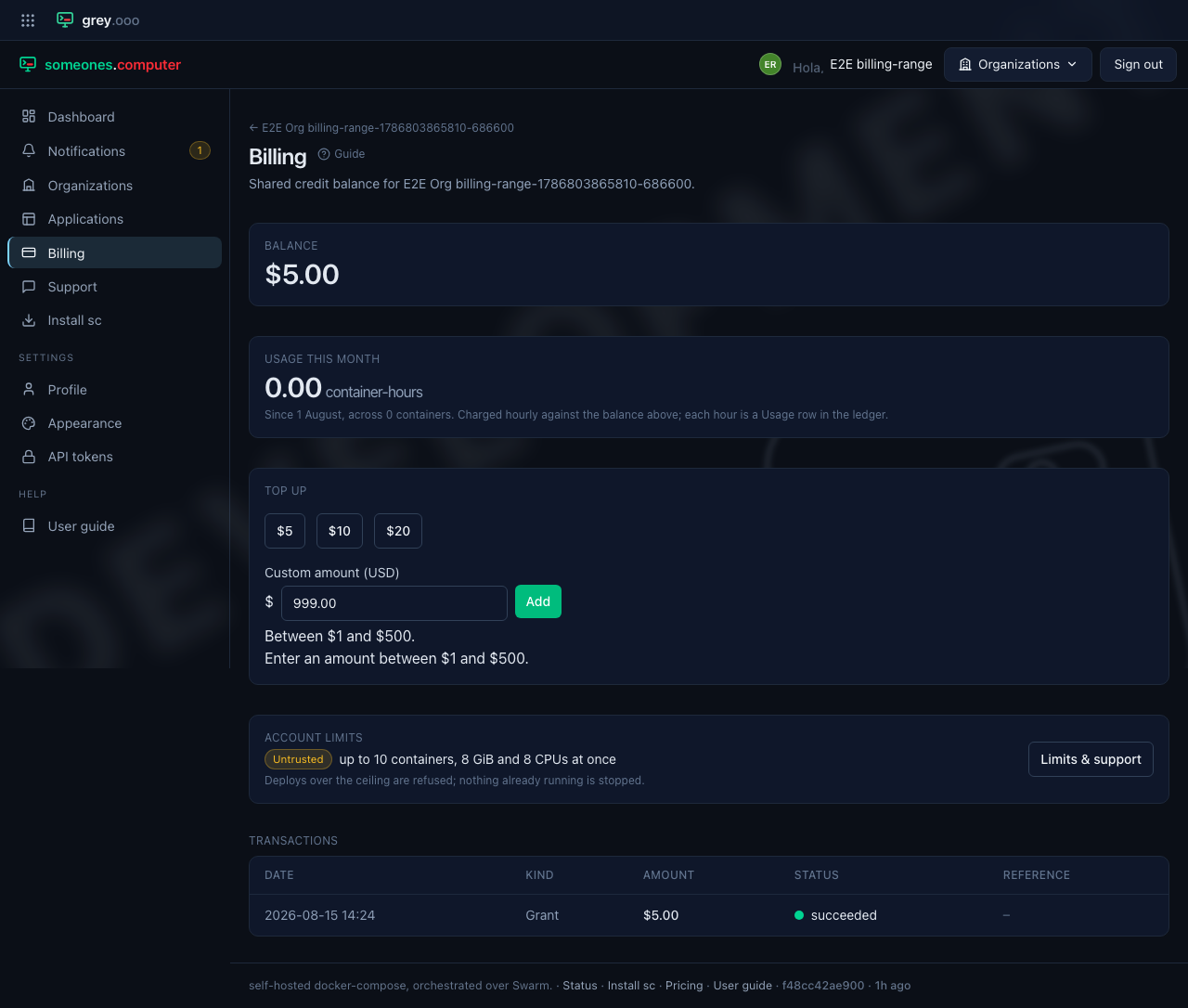
Choose one of the three fixed amounts ($5/$10/$20), or enter a custom amount
between $1 and $500 and click Add. Either one creates a pending
transaction and redirects you to Stripe Checkout to complete payment; Stripe's
webhook then flips it to succeeded (or failed, if the Checkout session
expires unpaid).
Amounts outside the $1–$500 range are rejected before anything is created:
Redeeming a gift card
A gift card credits a chosen organization once. Type the code (GC-XXXXXXXX)
into Redeem a gift code on this page and select Redeem—or, if you
were handed a card with a QR code or link, open it and click Redeem this
card; you'll be asked to sign in or create an account first if you aren't
already, then to pick which organization to credit if you belong to more than
one. Either way, the card can only be redeemed once, and the row shows in the
ledger as a Gift card.
Redeeming without opening the billing page
Two public pages take you in before you have an account:
| Page | What it shows |
|---|---|
The card's own link (/g/ and a long token) |
The page behind the QR code. It shows the card's value and a Redeem this card button |
/g |
Redeem a gift card. Type the code by hand if you have no QR scanner. The card's page links to it as Enter your code |
Both pages read without an account. The redeem step needs one. If you aren't signed in, the platform sends you to sign in and then brings you back to the card.
The confirm page, Redeem your gift card, shows the value. With one organization it says which one gets the credit. With several, you pick. An account with no organization can't redeem. The platform tells you to create one first.
A card you can't redeem says why: someone redeemed it, the team voided it before use, or it expired. A wrong code or a card page that doesn't exist gets a generic answer, and the platform limits how fast one source can try codes. A manual code stays in your session only, so if the session expires the platform asks you to enter the code again.
Transaction history
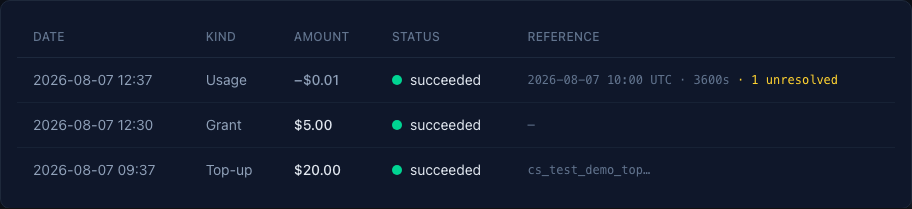
Every movement stays in the ledger, newest first, money in and money out in one list—the balance shown earlier is the plain sum of it. The Kind column says which is which:
| Kind | What it's | Reference column |
|---|---|---|
Top-up |
Money you paid in via Stripe Checkout | The Checkout session |
Grant |
Credit the platform gave you—the $5 on approval | — |
Usage |
One hour of metered usage, charged—compute, managed-service storage, or engine load | The hour, plus whichever the row is: container-seconds and any unresolved containers for compute, the byte size for storage, or the engine-time for load |
Gift card |
Credit from a redeemed gift card | — |
A steady workload writes the same charge every hour. The page shows a run of these as one line. The line shows the total, the charge for one hour, the meter, and the first and last hour of the run. Select Show each hour to see each row in the run. A run holds only rows from one meter, with the same amount, for hours that touch. A different amount, a gap in the hours, or a top-up, a grant, or a gift card starts a new line. The ledger itself doesn't change. Each hour is still its own row, and the balance is still their sum.
Every top-up attempt—successful, failed, or still pending—stays in the
ledger. Only succeeded rows count towards the balance; grants and usage charges
are succeeded from the moment they're written, since neither is waiting on
anything.
For operators: a Stripe refund doesn't adjust the balance. The platform subscribes to
checkout.session.completedandcheckout.session.expiredand nothing else, so a refund issued from the Stripe dashboard never reaches this ledger—the credit stays spendable and the balance shown here is then wrong by the refunded amount. This is deliberate: there is no refund path, and money going back out is handled outside the platform. If you issue one, correct the ledger by hand.