Builds (platform admin)
Every revision the platform has been asked to build, whose it is, what came out of it, and what the build printed on the way. It lives under Admin → Builds and requires the platform-admin role.
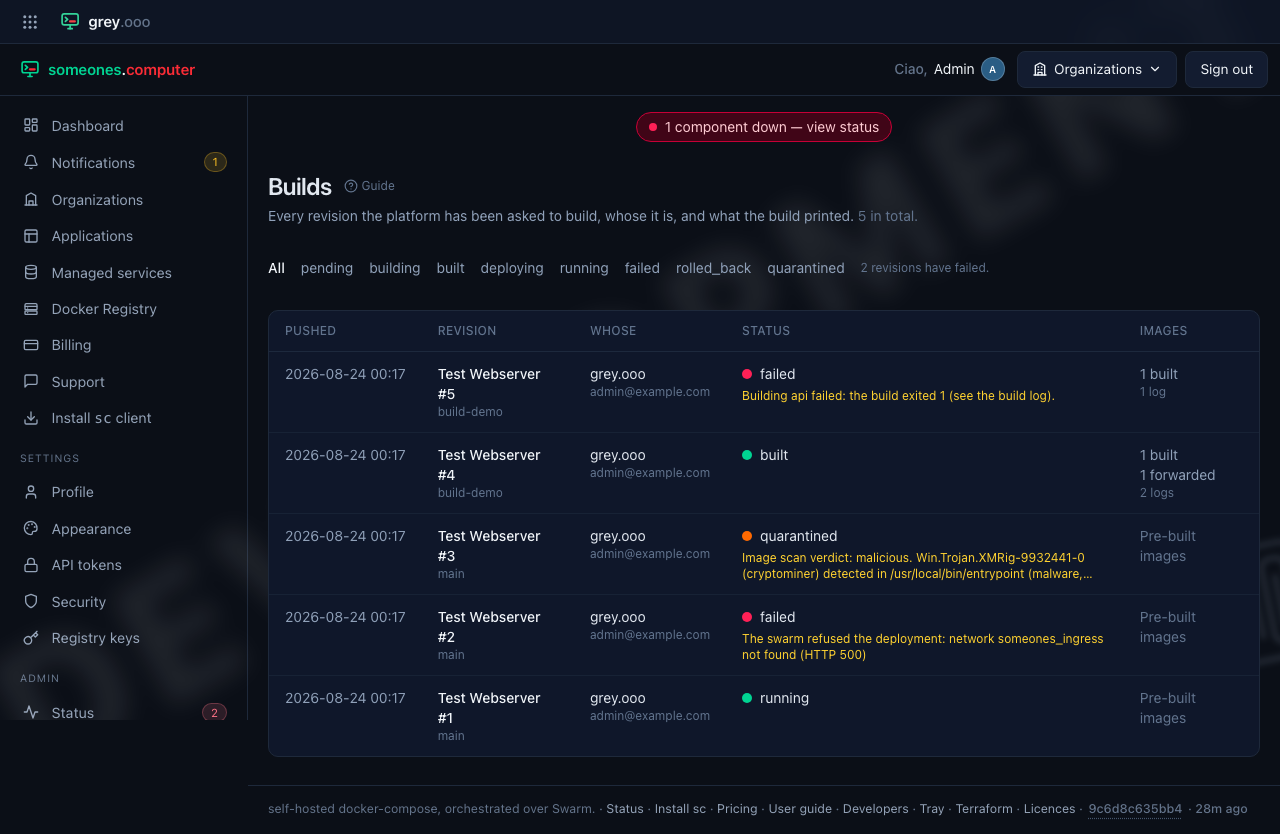
This page exists because the logs were unreadable. A build log is kept on purpose—it's the one artefact that answers "why did this fail?"—but the only route to it went through the owning application, and that route is scoped to your own applications. So the log a tenant was asking about was written correctly, retained on purpose, and reachable by nobody who gets asked the question. Being an admin didn't help. No route took the role.
| Column | Means |
|---|---|
| Pushed | When the revision came into being—when sc deploy uploaded it, in the normal case. |
| Revision | The application and its revision number, linked through to the build. Underneath, the revision's name—the handle sc start/sc stop and sc-tray use, and the name the tenant will quote when they write in. |
| Whose | The organization, and the account that pushed it. A revision outlives the account that pushed it, so this can read Account deleted. |
| Status | Where the revision is in the pipeline, and the reason underneath when there is one. |
| Images | How many services were built here, how many were forwarded by the client, and how many kept a log. |
"Pre-built images" isn't a failure. A compose file that names published images has nothing to build and passes straight through the build worker. The column says so in words rather than showing a zero that reads as produced nothing.
Filter to failed for the question this page actually gets opened for. The
filter survives the paging links, so page two of the failures stays page two of
the failures.
One revision
Clicking through gives the whole build: every service, the image reference it produced, the Dockerfile as uploaded, and the log—open, not collapsed, because the reason you came is almost always in it.
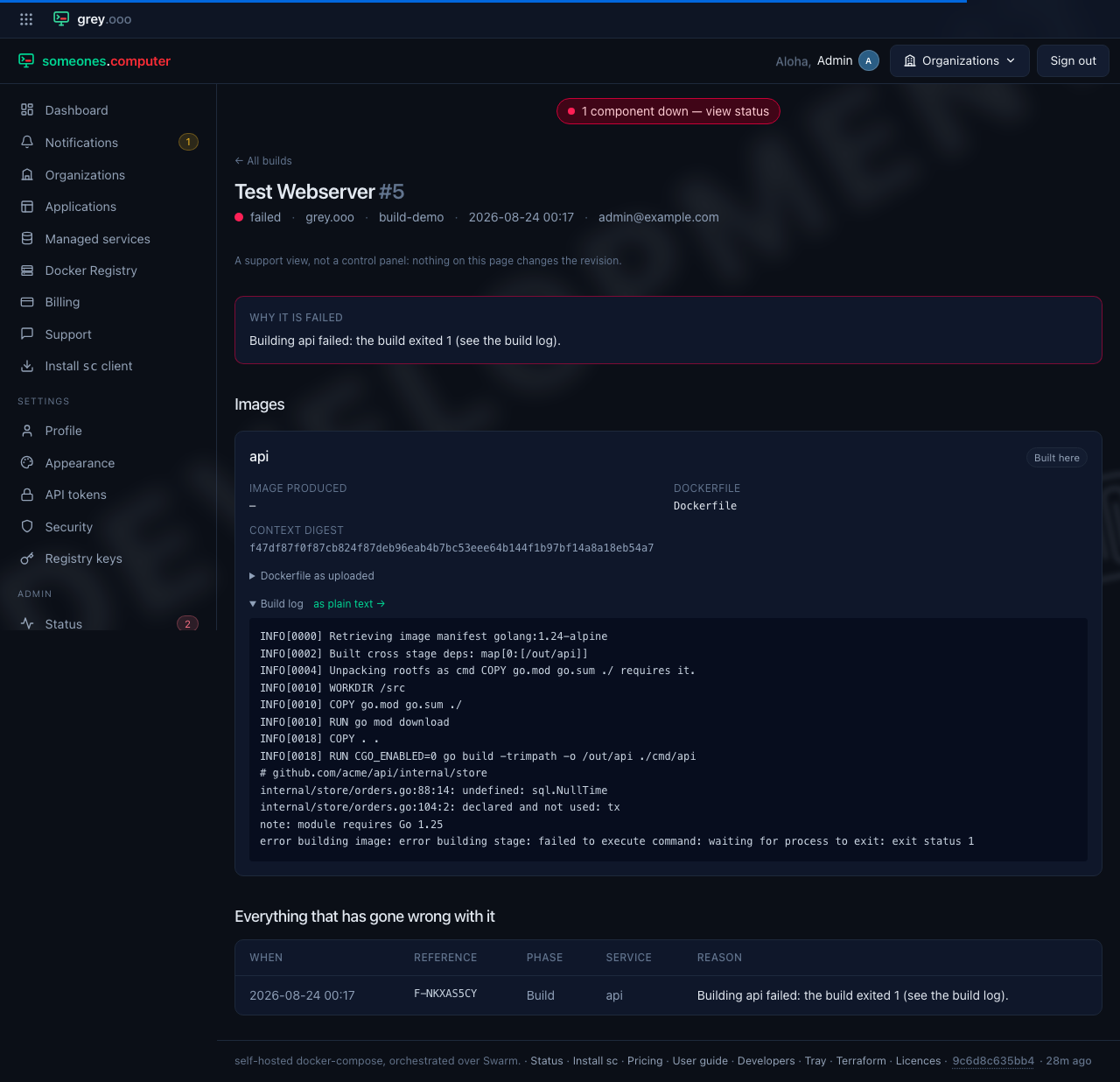
Each service is labelled with how its image got into the registry, and there are only two answers:
- Built here—the platform ran the tenant's Dockerfile on an uploaded build context. The log is what BuildKit printed.
- Forwarded by the client—
scfound a private image it could already reach, and uploaded the image itself because the platform had no way to pull it (see registry). Nothing was built, and the log is the loader pushing the tarball.
A service with no image reference is one whose build never got as far as pushing one. That's a different thing from an image that's merely missing, and the page doesn't conflate them.
You can also get the build log on its own, as plain text, from the link beside
it. That's what you want for a curl, a search, or a paste into a support thread.
Logs are trimmed to their last four megabytes when stored: a build that failed
did so at the end, and a runaway log's first four megabytes are the least
interesting part of it.
What this page won't do
It's read-only, on purpose. Nothing here changes a revision. Every state a revision can move to already has an operator surface with its own audit trail. Scan quarantine covers a quarantined revision. The application's own page covers a redeploy. A support view must not become an untracked way to reach either.
Environment values are never shown. A compose file routinely has a password typed straight into it, and this is the one page in the application that reads another tenant's revision. This page shows Dockerfiles and build output: they're what the question is about, and they're text the tenant can already read themselves.
This page lists failures with their reference—F-24GT1BQ7 and the like—but
doesn't link them, because only the organization that owns a failure can reach its own page.
The reference is what the tenant quotes; failure diagnosis is
where an operator takes it.